Change Mythtv Password For Mysql And Mythweb
You may want to change the password for Mythtv, especially that when Mythtv is first installed it auto generates a generic password to connect the front end to the back-end, connect to the database, and for the Mythweb to connect to the database. Fortunately all of these share the same password. The auto generated generic password could be troublesome, so here is how to change it. I will explain on how to change these passwords using ssh. Ssh should be ready for use on the Mythtv box first.
Changing Mysql Password
First the password should be changed for the Mysql database. open ssh terminal. These following commands will change the mysql password to “mythtv”:
# mysql -u root -p mysql
myqsl> GRANT ALL PRIVILEGES ON *.* TO 'mythtv'@'localhost' IDENTIFIED BY 'mythtv' WITH GRANT OPTION;
mysql> UPDATE user SET Password=PASSWORD('mythtv') WHERE user='mythtv';
mysql> FLUSH PRIVILEGES;
mysql> quit
Changing Mythweb Password To Match
Now that the database password has been changed, lets change the password for mythweb. In ssh terminal edit the mythweb.conf file. I preffer nano.
# sudo nano /etc/apache2/sites-available/mythweb.conf
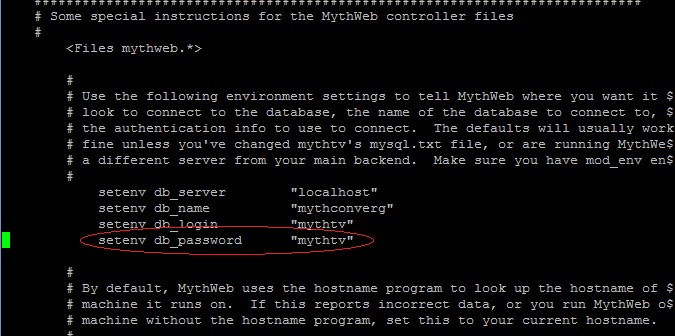
Find the spot in the file where it says “setenv db_password”. You will see the old password. Change it to “mythtv” so that it matches the database password.
Reboot Mythtv, then change the passwords on any front ends or devices to “mythtv” as needed.