How to fix Synology Active Backup for Business error code 0x8004230F or 0x80042306.
Symptom
0x8004230F or 0x80042306 – An error occurred when certain Volume Shadow Copy Service providers on the PC created snapshots.
Solution
Check for and remove other VSS providers
- Type cmd in the Windows search bar or in Run window.
- Right-click on Command Prompt and select Run as administrator.
- Enter the command Vssadmin list providers to see what VSS providers are on your computer. If there are VSS providers other than Microsoft Software Shadow Copy Provider, they will appear in the Command Prompt window. Otherwise, “Microsoft Software Shadow Copy Provider” will appear by default.
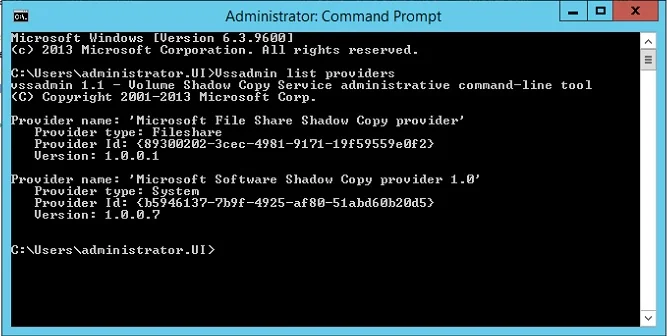
If there are any VSS providers on your device other than Microsoft Software Shadow Copy Provider, make sure to remove them before proceeding with the backup. For steps on how to remove an unwanted or unnecessary VSS Provider form Windows, follow the step found here: