AD Replication issues, USN rollback, and the Invocation ID. Recovering A Domain Controller From A USN Rollback Lock
DCs suffer from USN rollback lock when there is a discrepancy in update sequence number between DCs.
Cause and How to Check
There are a variety of indicators, all of which can let you know if the server is in a rollback state. The more of these you see, the more you can suspect it to be the case.
- The server (or the AD database) has been recently restored or a virtual DC reverted from snapshot – This doesn’t just happen on its own. An action on the part of an administrator is required for USN rollback to even be considered as a possible cause. Otherwise, it’s more likely some other AD replication issue.
- The Netlogon service is Paused – This is pretty rare with the exception of USN rollback.
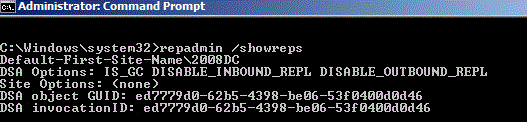
- Inbound & Outbound replication disabled – Check this by running “repadmin /showreps” from an elevated command prompt.
- If HKLM\System\CurrentControlSet\Services\NTDS\Parameters\DSA not Writable is set to 4 – Also not likely to happen outside USN rollback scenarios.
- Directory Services Events – Look for the following events in the Directory Services log: 2095, 1113, 1115. Events can have a great many causes and are a great way of tracking down replication problems as a whole.
- Repadmin showutdvec output – Run “repadmin /showutdvec DC1 dc=domain,dc=com” on DC1. Run “repadmin /showutdvec DC2 dc=domain,dc=com” on DC2. If the replication partner has a higher USN value than the DC has for itself, it could indicate a problem.
Output from servers should look something like this:
Output from server 1

Output from server 1