GPO Not Applied To Laptops Or Desktops Over WiFi
I’m writing this for anyone who may come across this problem. It took me forever to find the answer and it was actually a pretty easy fix. So hopefully I save someone a lot of headache and grief.
I was deploying / installing an antivirus msi packet using Group Policy on a Windows 2008 server. It was straight forward setting up the policy then sent a restart command to all the workstations using shutdown -i. Everything seemed to go just fine at first, but then I noticed some workstations (mostly all the laptops) had not completed the install process. I restarted again and nothing. After what seemed hours of trying different things I finally realized they all (all the laptops and some desktops) had one thing in common – they were all connecting through WiFi.
The Solution.
I was successful finally by doing the following.
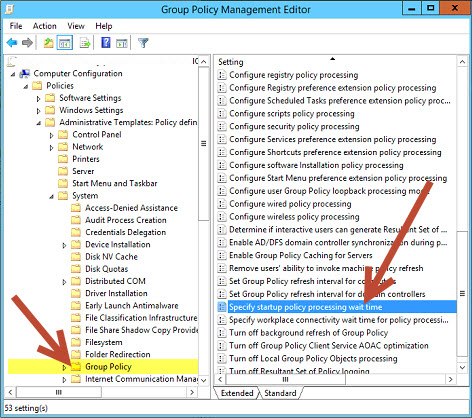
- First I created a new policy called “Specify startup policy processing wait time”. Then linked it to all the workstation containers on the network in the Group Policy Management console.
- In a Group Policy applied to these workstations, navigate to:
Computer Configuration > Policies > Administrative Templates > System > Group Policy
- Then I enabled the “Specify startup policing processing wait time” and left the default setting. For me it was 120 seconds.
- Then “apply” and “OK”.
Note: You may see something different than “Specify startup policing processing wait time”. I’ve seen “Startup policing processing wait time” in some cases. Just look for something similar.
- I used the shutdown -i to send a restart / reboot command to all WiFi workstations.
Vualá, all remaining workstations accepted and installed the antivirus.
I also found this solution increase the success rate of the GPO applications.